

Planning a WordPress website in 2026 brings up one big question right away. How much will it cost? Prices vary, but the ranges are easy to predict once you know what drives them.
This guide breaks down WordPress website cost across design, development, hosting, plugins, and maintenance. You will see clear price ranges, what affects them, and how to plan a budget that fits your goals.
Whether you run a small business, a startup, or a growing brand, the numbers below help you compare options and avoid surprises. Let us walk through the full picture, piece by piece.
Quick WordPress Website Cost Overview
WordPress website cost depends on several moving parts. Size, design, features, hosting, plugins, and ongoing support all shape the final number. Here is a quick snapshot before we break down each layer.
Basic to small business build: $500 to $5,000
Monthly running cost: $10 to $150
Domain: $10 to $25 per year
Hosting: $3 to $30 per month
Maintenance: $30 to $150 per month
Average WordPress Website Cost In 2026
Most basic to small business WordPress websites cost between $500 and $5,000. The lower end covers simple template sites, while ecommerce, custom design, and advanced features push the price higher.
WordPress Website Cost Per Month
Running a WordPress site usually costs $10 to $150 per month. This covers hosting, key plugins, security tools, backups, regular updates, and small support tasks that keep the site healthy.
One-Time Cost vs Ongoing Website Cost
A common split is $500 to $5,000 as a one-time build cost, plus $10 to $150 per month after launch. The one-time part covers setup, design, and development. The monthly part covers hosting, maintenance, and updates.
Total WordPress Website Cost Summary
For a small business site, expect a first-year total of roughly $700 to $6,000. This includes domain, hosting, theme, plugins, design, development, security, and basic maintenance combined.
Why Invest In WordPress Website Development?
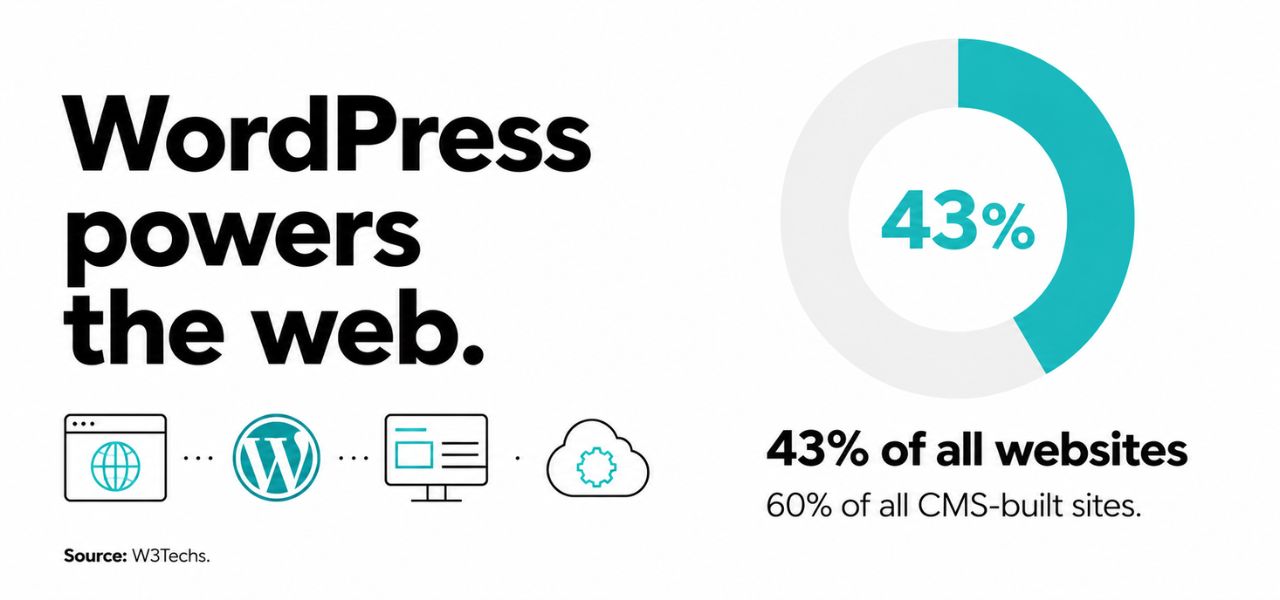
WordPress powers a large share of the web because it is flexible and easy to manage. According to W3Techs, it runs about 43% of all websites and close to 60% of sites built on a content management system, which is more than every other platform combined. Businesses choose it for content control, design freedom, SEO support, and room to grow over time.
A professional WordPress site gives you cleaner design, a clear page structure, and easy content updates, along with a solid SEO setup and a better mobile experience. It fits service websites, blogs, lead generation sites, ecommerce stores, and content-heavy brands, and it adapts as you add features without forcing a full rebuild.
As your business grows, WordPress grows with it. You can add SEO pages, landing pages, blog content, forms, integrations, and analytics, then expand further when traffic and goals increase.
Is WordPress Free of Cost?
Yes, WordPress is free. It is a content management system, or CMS, which is a tool used to build and manage websites. The software is open-source and released under the GPL license, according to WordPress.org, so anyone can download and install it at no cost.
The free part is the software itself. For a real business website, you still need a developer to design and build it the way your brand needs, along with a domain and hosting to put it online. These are separate from the free WordPress core.
After launch, there is a small recurring cost to maintain the site, such as keeping it updated, secure, and running well. For most small business websites, this stays minimal and is far lower than the cost of the initial build.
Main Factors That Affect WordPress Website Pricing
No two WordPress projects cost the same. Pricing shifts based on website size, design needs, the feature list, integrations, content volume, hosting, and how much long-term support you want.
Website Size and Number of Pages:
More pages mean a higher cost. Each page may need its own design, content setup, testing, internal links, and basic SEO. A five-page site is far cheaper to build than a fifty-page one.
Design Complexity and Customization:
Simple template-based designs cost less. Custom layouts, animations, detailed branding, and unique sections take more design time and skill, which raises the price for the look you want.
Plugins and Website Functionality:
Features drive cost. Contact forms are cheap, but bookings, memberships, ecommerce, product filters, calculators, custom fields, and third-party integrations each add development time and sometimes license fees.
Content, SEO, and Marketing Needs:
Content and SEO work add to the budget. This can include copywriting, keyword use, meta tags, a clear page structure, blog setup, analytics, and content designed to turn visitors into customers.
Security Requirements:
Security adds a small but important cost. It can cover SSL, firewalls, malware scans, login protection, regular backups, plugin updates, and ongoing monitoring to keep the site safe.
Hosting, Traffic, and Performance Needs:
Higher traffic needs stronger hosting. Busy sites may require caching, a CDN, speed tuning, and uptime monitoring, all of which add to both the build cost and the monthly running cost.
Maintenance, Updates, and Support:
Ongoing maintenance runs about $30 to $150 per month for small sites. It covers plugin and theme updates, backups, bug fixes, security checks, and small content edits after launch.
| Factor | Lower cost when | Higher cost when |
|---|---|---|
| Pages | Few simple pages | Many custom pages |
| Design | Ready-made template | Fully custom layout |
| Features | Basic forms only | Ecommerce, memberships, APIs |
| Hosting | Shared hosting | Managed, VPS, or cloud |
| Support | Self-managed | Monthly retainer |
WordPress Website Cost Breakdown
The total price is really a stack of smaller costs. Once you add up domain, hosting, SSL, theme, plugins, design, development, SEO, and maintenance, the full picture becomes much clearer.
1. Domain Name Cost:
Most domains cost $10 to $25 per year. The exact price depends on the extension, such as .com or .net, the registrar, the renewal rate, and whether the name is premium.
2. Web Hosting Cost:
Hosting runs $3 to $30 per month for most small sites. Shared hosting sits at the low end, while managed WordPress, VPS, cloud, or dedicated hosting costs more for better speed and support.
3. SSL Certificate Cost:
SSL can cost $0 to $100 per year. Many sites pay nothing because Let's Encrypt offers free, automated SSL certificates. Paid certificates add extra validation or warranty features.
4. WordPress Theme Cost
Themes cost $0 to $100 for most needs. Free themes keep costs down, while premium themes often add more layouts, regular support, and extra design options that save time later.
5. WordPress Plugin Cost:
Plugins cost $0 to $300 per year, depending on what you need. They handle SEO, forms, ecommerce, security, backups, speed, and analytics. Many are free, but premium versions add features and support.
6. Website Design Cost (One-Time):
Design costs $300 to $2,500 for most small to mid sites. The price depends on page count, branding, mobile layout, the number of revisions, and how many custom sections you need.
7. WordPress Development Cost (One-Time):
Development costs $500 to $5,000 for typical builds. This covers theme setup, plugin setup, custom changes, integrations, testing, and launch support to get the site live and working.
8. SEO and Marketing Cost:
SEO and marketing start at $100 to $1,000. The work can include keyword research, on-page SEO, technical checks, tracking setup, and a content plan that supports steady growth.
9. Security Cost:
Security costs $0 to $200 per year. This can cover SSL, malware protection, firewalls, backups, login security, and monitoring tools that watch for threats.
10. WordPress Maintenance Cost:
WordPress website maintenance costs around $30 to $150 per month. It keeps the site updated, secure, backed up, and running smoothly long after launch, which protects your earlier investment.
| Cost Item | Typical Range | Cost Type |
|---|---|---|
| Domain name | $10 to $25 / year | Recurring (yearly) |
| Web hosting | $3 to $30 / month | Recurring (yearly, often billed annually) |
| SSL certificate | $0 to $100 / year | Recurring (yearly) |
| Theme | $0 to $100 | One-time (some renew yearly) |
| Plugins | $0 to $300 / year | Recurring (yearly) |
| Design | $300 to $2,500 | One-time |
| Development | $500 to $5,000 | One-time |
| SEO and marketing | $100 to $1,000 | Recurring (ongoing) |
| Security | $0 to $200 / year | Recurring (yearly) |
| Maintenance | $30 to $150 / month | Recurring (monthly) |
WordPress Website Design and Development Pricing by Project Type
Different website types carry different price tags. Design, content, features, and e-commerce needs change from one project to the next, so it helps to look at typical ranges by type.
1. Basic or DIY WordPress Website Cost
A basic site costs $100 to $800. This range suits simple pages, personal websites, early-stage ideas, and very small businesses that need a presence without custom work.
2. Corporate WordPress Website Cost:
A corporate site costs $1,000 to $5,000. These sites carry more pages, team sections, case studies, custom layouts, internal approvals, and a stronger overall structure.
3. Advanced WordPress Website Cost
An advanced WordPress website costs around $3,000 to $10,000. This covers filters, memberships, custom post types, integrations, dashboards, or special workflows that go beyond a standard site.
4. E-commerce WordPress Website Cost
A WordPress e-commerce store costs around $1,500 to $8,000. Costs reflect products, cart, checkout, payment gateways, shipping, tax settings, automated emails, and order tracking.
| Project Type | Typical Range | Scope Of Website |
|---|---|---|
| Basic or DIY WordPress Website | $100 to $800 | 1 to 5 pages, simple online presence |
| Corporate WordPress Website | $1,000 to $5,000 | 10 to 25 pages, multiple sections |
| Advanced WordPress Website | $3,000 to $10,000 | 15 to 30+ pages with custom features |
| WooCommerce / E-Commerce | $1,500 to $8,000 | 10 to 30+ pages plus 200+ products |
WordPress Website Cost Based on Business Size:
Business size shapes the budget too. Larger companies usually need more pages, stronger features, better support, and a plan for the future, all of which affect the final cost.
1. Startup WordPress Website Cost:
A startup WordPress website can cost around $500 to $2,500. At this stage, the focus is usually on a few MVP pages, basic SEO, contact forms, and service sections, with a flexible setup that is easy to update as the business grows.
2. Small Business WordPress Website Cost:
A small business WordPress website can cost around $800 to $3,500. This usually covers service pages, an about page, a contact page, forms, testimonials, local SEO, and a clean mobile design that works well for everyday customers.
3. Mid-Sized Business WordPress Website Cost:
A mid-sized business WordPress website can cost around $2,000 to $8,000. At this level, you can expect more content, custom layouts, integrations, analytics, landing pages, and a higher level of ongoing support.
4. Enterprise WordPress Website Cost
An enterprise WordPress website can cost around $5,000 to $15,000 and up. These larger projects often include custom features, strong security, approval workflows, performance work, user roles, and steady long-term support.
| Business Size | Typical Range |
|---|---|
| Startup | $500 to $2,500 |
| Small business | $800 to $3,500 |
| Mid-sized business | $2,000 to $8,000 |
| Enterprise | $5,000 to $15,000+ |
WordPress Development Pricing Models:
There is more than one way to pay for WordPress work. Pricing can be fixed, hourly, monthly, or team-based, depending on scope, timeline, support level, and overall complexity.
1. Fixed Project Pricing:
Fixed pricing runs $500 to $5,000 for smaller projects. It works best when the scope and timeline are clear from the start, so both sides know what to expect.
2. Hourly WordPress Development Pricing:
Hourly rates run $15 to $75 per hour for many developers. This model fits updates, fixes, small changes, and troubleshooting where the total work is hard to predict in advance.
3. Monthly Retainer Pricing:
Retainers run $100 to $1,000 per month. They suit ongoing maintenance, support, SEO, reporting, and steady improvements handled by the same team each month.
| Pricing Model | Typical Range | Best For |
|---|---|---|
| Fixed project | $500 to $5,000 | Clear, defined scope |
| Hourly | $15 to $75 / hour | Fixes and small changes |
| Monthly retainer | $100 to $1,000 / month | Ongoing support and SEO |
What Should You Choose? Freelance WordPress Developer or Agency
Both freelancers and agencies can build a great WordPress site. The right pick depends on your budget, project size, timeline, quality needs, and how much support you expect after launch.
1. Freelance WordPress Developer
A freelancer is a good fit for small websites, simple fixes, tighter budgets, and projects where you want direct, one-on-one communication. They are often quick to start on focused tasks.
Pros:
- Lower hourly cost in most cases
- Direct, one-on-one communication
Cons:
- Limited availability if they get busy
- Fewer services under one roof
2. WordPress Web Development Agency
An agency suits larger websites that need planning, design, development, SEO, testing, and ongoing support. With a full team, an agency can handle bigger scopes and tighter deadlines.
Pros:
- Full team for design, development, and support
- Structured process and clear timelines
Cons:
- Higher overall pricing
- Less direct contact with the person doing the work
Do You Know?
According to WPZoom, more than half of the world's top 10,000 websites run on WordPress, including major names like Time Magazine, Sony Music, and Meta's newsroom.
Hidden WordPress Website Development Costs Businesses Often Miss:
A low upfront price can hide future costs. Updates, premium tools, support, security, hosting upgrades, and even full rebuilds can add up if they are not planned from the start.
1. Cheap Themes and Plugins That Create Problems Later
Bargain themes and plugins can backfire. They may cause slow speed, poor support, update problems, security risks, limited options, and compatibility issues that cost time and money to fix.
2. Poor Hosting and Performance Issues
Cheap hosting often leads to slow loading and downtime. Weak support and a poor user experience can hurt both your search rankings and your sales, which makes the savings short-lived.
3. Missing Security and Backup Costs:
Skipping security is risky. Without backups, malware scans, login protection, update checks, restore options, and monitoring, a single breach can cost far more than the protection would have.
4. Future Redesign or Rebuild Costs
Poor planning has a price. Weak design or messy development can force a costly rebuild within a year or two, so it often pays to build it right the first time.
5. Extra Costs For Custom Features and Integrations
Custom features add up over time. CRMs, payment tools, booking systems, email tools, APIs, memberships, and custom workflows each bring setup costs and sometimes monthly fees.
How to Reduce WordPress Web Development Costs?
There are smart ways to lower the bill without cutting quality. Start small, use trusted tools, limit custom work, and plan future improvements in clear phases rather than all at once.
1. Build an MVP First:
An MVP, or minimum viable product, includes only the pages and features you truly need. It helps you launch faster and keeps early costs low while you test what works.
2. Use Scalable WordPress Themes and Plugins:
Flexible themes and plugins reduce custom work. They can support future pages, features, and growth, so you avoid paying for major changes every time the business expands.
3. Keep the First Version Simple
A simple first version costs less to design, build, test, and maintain. You can always add more once the site proves its value and you understand what visitors want.
4. Use Existing Tools Where Possible
Ready-made tools save development time. There are trusted options for forms, payments, email, booking, analytics, SEO, security, backups, and ecommerce that work well out of the box.
5. Choose Reliable Hosting:
Pick hosting that can scale. The right plan avoids overpaying early while still allowing better performance as your traffic grows, so you upgrade only when you actually need to.
Get a Custom WordPress Website Cost Estimate
A custom estimate is always more accurate than a rough guess. When your goals, pages, features, timeline, content, and support needs are clear, the numbers come into much sharper focus. When you are ready, Nexal IT Services can prepare a custom estimate based on your exact goals, so you get a realistic budget instead of a one-size-fits-all number.
Conclusion:
WordPress website cost comes down to size, design, features, hosting, plugins, and support. Most small business sites land between $500 and $5,000 to build, plus $10 to $150 per month to run.
The best budget is the one that fits your current needs and leaves room to grow. Plan for both the build and the upkeep so there are no surprises down the line.
Take time to compare options, ask clear questions, and choose tools you can trust. A well-planned WordPress site is an investment that keeps working for your business for years.
Frequently Asked Questions
A simple site can take one to three weeks, while larger or custom builds often take four to twelve weeks. The timeline depends on page count, design needs, features, content readiness, and revision rounds.