

In 2026, web application development cost usually starts from $8,000 to $20,000 for simple apps and can range from $45,000 to $180,000 or more for advanced web apps. With the help of AI, development can be faster and more cost-effective, but the final price still depends on your features, design, technology stack, integrations, security needs, timeline, and long-term maintenance.
This demand is growing because more businesses now depend on web apps to sell online, manage users, automate daily work, and serve customers faster. According to the US Census Bureau, e-commerce made up 16.9% of total US retail sales in the first quarter of 2026, showing how much business activity now happens through digital platforms.
AI is also changing how software is built, as Gartner predicts that 75% of enterprise software engineers will use AI code assistants by 2028. With the right use of AI, our teams can speed up parts of the web app development process, such as planning, coding, testing, and documentation. Still, a reliable web application needs expert thinking, clean architecture, security checks, proper testing, and long-term support.
How Much Does It Cost To Develop a Web App?
The typical cost to develop a web app in 2026 is around $8,000 to $180,000 or more. A small business workflow tool may sit near the lower end, while a full SaaS product, marketplace, or enterprise portal can reach the higher end.
The final price depends on what the app needs to do. User accounts, payments, dashboards, admin panels, search, reports, APIs, security, and mobile-friendly design all add time and cost.
A web app is not priced like a fixed product on a shelf. It is closer to building a house. The size, layout, materials, team, and finishing details all affect the total budget.
Average Cost of Web Application Development:
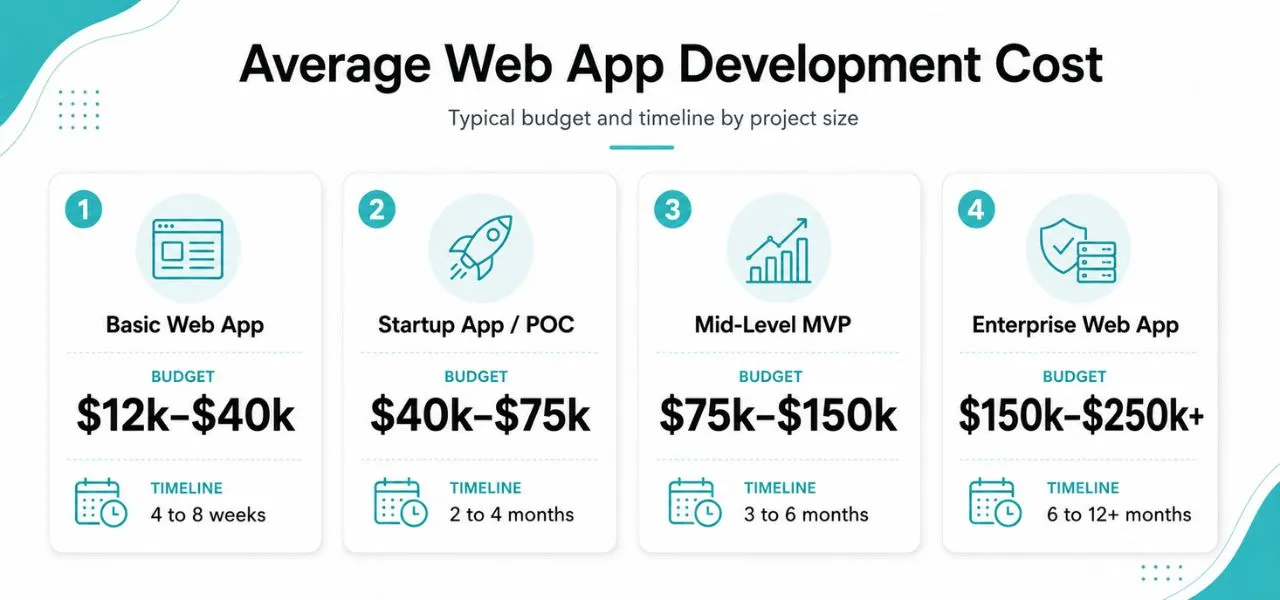
Here is a simple cost view for common web app types. These ranges are general US market estimates and can change based on project size, technical needs, design level, and long-term support.
| Web App Type | Estimated Cost | Estimated Timeline |
|---|---|---|
| Basic web app | $5,000 to $30,000 | 4 to 8 weeks |
| Startup app or proof of concept | $10,000 to $55,000 | 2 to 4 months |
| Mid-level web app or MVP | $20,000 to $100,000 | 3 to 6 months |
| Complex enterprise app | $60,000 to $180,000+ | 6 to 12+ months |
Basic Web Application Cost:
The cost to develop a basic web app is around $5,000 to $30,000. A basic app usually includes simple pages, a small database, contact forms, booking forms, basic user actions, and limited custom logic. This type of app is suitable for businesses that need a focused digital tool, such as a customer portal, business tracker, internal system, or small product catalog.
Cost of Startup Web Application Or Proof Of Concept
The cost to develop a startup web app or proof of concept is around $10,000 to $55,000. This type of project is built to test an idea before investing in a complete product. It may include user login, a simple dashboard, basic admin controls, and one or two core features that help startups collect feedback, show investors, validate demand, and improve the product direction.
Cost of Mid-Level Web Application or MVP
The cost to develop a mid-level web app or MVP is around $20,000 to $100,000. This level usually includes more complete user journeys, payment systems, role-based access, third-party integrations, notifications, analytics, and stronger admin controls. It is a common choice for SaaS products, client portals, marketplaces, workflow tools, and growing business platforms.
Complex or Enterprise-Level Web Application Cost:
The cost to develop a complex or enterprise-level web app is around $60,000 to $180,000 or more. These apps often include custom workflows, advanced permissions, large databases, AI features, multiple user roles, reporting tools, and strong security needs. They also require detailed planning, careful testing, DevOps setup, performance monitoring, ongoing support, and future scaling.
Typical Web Application Feature Costs
Feature pricing depends on detail level. A simple login form costs less than full multi-factor login with role controls.
| Feature | Estimated Cost |
|---|---|
| User login and registration | $3,000 to $10,000 |
| Admin dashboard | $5,000 to $25,000 |
| Payment integration | $4,000 to $15,000 |
| Search and filters | $3,000 to $15,000 |
| Reports and analytics | $5,000 to $30,000 |
| Chat or real-time updates | $8,000 to $35,000 |
| API integrations | $3,000 to $25,000+ |
Why Do You Need a Web Application?
A web application helps your business do more than a basic website. It lets users create accounts, book services, make payments, track orders, manage subscriptions, and use your services online. This is why businesses now build web apps for customer portals, SaaS platforms, dashboards, booking tools, and internal systems.
The global progressive web apps market was valued at about $2.08 billion in 2024.
Gartner reported that the application development market reached $23.9 billion in 2024.
Worldwide SaaS revenue reached $218.5 billion in 2024, showing strong demand for cloud-based apps.
For startups, agencies, SaaS companies, and service businesses, a web app can turn an idea into a working product. It can support user dashboards, admin panels, online payments, reports, subscriptions, and automated workflows. These features help businesses serve customers faster and manage operations from one secure place.
A good web app can save time, reduce manual work, improve customer service, and create new revenue channels. It can automate repeated tasks, store useful business data, and help teams make better decisions. In simple words, a web app gives your business a practical system for growth, not just an online presence.
Factors That Influence Web App Development Cost:
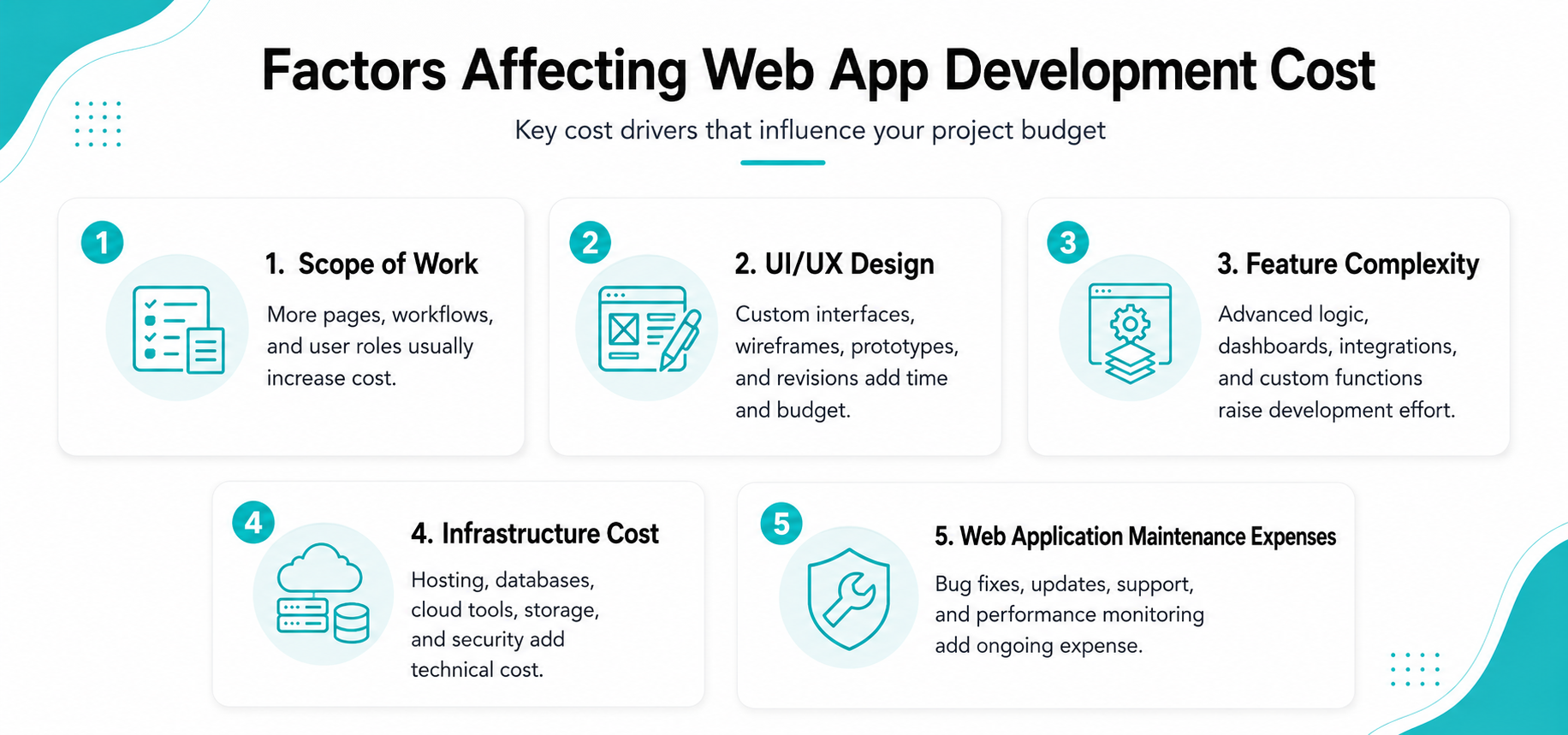
Web application development cost depends on more than the number of pages or screens. The final price is shaped by project scope, UI/UX design, feature complexity, backend logic, database structure, security needs, hosting setup, testing, and long-term support. The clearer these details are before development starts, the easier it is to control budget and timeline.
Scope of Work
Scope of work defines everything your web app needs to include, such as user roles, dashboards, admin panels, payment flows, reports, integrations, and customer actions. A clear scope helps the development team estimate time, plan features, and avoid confusion. A vague scope often leads to extra revisions, delayed delivery, and higher development costs.
UI/UX Design
UI/UX design affects both the look and usability of your web application. A clean interface, simple navigation, clear buttons, and smooth user journeys make the app easier for customers and teams to use. Custom design usually costs more than templates, but it can improve signups, task completion, customer trust, and long-term product value.
Feature Complexity
Feature complexity has a major impact on web app development cost. Simple features like contact forms, profile pages, and basic search are faster to build. Advanced features such as subscriptions, coupons, invoices, refunds, role permissions, AI tools, real-time chat, or custom reports need more backend logic, testing, and edge-case handling.
Infrastructure Costs
Infrastructure costs include the servers, databases, storage, backups, security tools, deployment pipeline, and monitoring systems that keep the web app running. A small app may only need basic cloud hosting, while a high-traffic SaaS platform may need AWS, Azure, load balancing, staging servers, CDN setup, auto-scaling, and performance monitoring.
Web Application Maintenance Expenses
Web application maintenance expenses include bug fixes, software updates, security patches, speed improvements, dependency upgrades, database checks, and small feature changes after launch. These costs can vary based on the app type, features, and long-term support needs. For online stores, you can also read our detailed guide on eCommerce website maintenance cost to understand what ongoing store maintenance may include.
Cost By Web Application Type
Different web app types need different levels of planning, design, frontend work, backend logic, and maintenance. The structure of the app affects how users move through it, how data loads, how search engines read it, and how easily the product can scale as traffic, features, and customer needs grow.
Multi-Page Applications
The cost to develop a multi-page application is usually around $8,000 to $50,000+. These apps load separate pages for different actions, making them useful for content-heavy platforms, admin panels, business portals, directories, and service websites. They are often easier to manage for SEO, large content sections, and clear navigation.
Single-Page Applications
The cost to develop a single-page application is usually around $15,000 to $75,000+. An SPA loads once and updates content without full page reloads, which makes it feel fast and smooth for dashboards, SaaS tools, CRMs, analytics platforms, and customer portals. These apps usually need stronger frontend work, API planning, and state management.
Progressive Web Applications
The cost to develop a progressive web application is usually around $20,000 to $90,000+. A PWA works like a web app but can feel closer to a mobile app. It may support push notifications, offline access, faster loading, and install-like behavior. PWAs are useful for businesses that want mobile-friendly access without separate iOS and Android apps.
Cost Breakdown by Web App Development Method
The development method you choose affects cost, speed, flexibility, and long-term growth. For web applications, the right method depends on your app type, feature complexity, budget, and how much custom work your business needs.
Template-Based Web App Development
The cost for template-based web app development is usually around $5,000 to $25,000. This method uses prebuilt UI kits, dashboard templates, landing page layouts, or admin panels to reduce design and frontend work. It works well for simple portals, MVP dashboards, internal tools, and apps that do not need a fully custom user experience.
Low-Code and No-Code Web App Development
The cost for no-code or low-code web app development is usually around $3,000 to $20,000 for simple tools, and higher for advanced workflows. This method uses visual builders and ready-made blocks, which is why Gartner expects the low-code development technology market to reach $58.2 billion by 2029. It is useful for prototypes, internal tools, and early-stage apps.
Web Application Development Cost By Phase
A web app is built in phases, and each phase plays an important role in the final result. When the work is divided this way, it becomes easier to understand the budget, track progress, and avoid confusion during design, development, testing, and launch.
Research and Market Analysis Cost:
Research is the first step in web app development. It includes understanding your business goals, users, competitors, feature needs, and technical requirements. This phase usually costs $1,000 to $8,000, or around 5% to 10% of the total project budget.
This step helps the development team build with a clear direction. It also reduces the risk of spending money on features that users may not need. A proper research phase makes the next stages more focused and easier to manage.
Web App Design Cost:
The design phase includes wireframes, user flows, visual screens, clickable prototypes, and design systems. For most web apps, design can cost between $3,000 and $20,000, depending on the number of screens and the level of detail.
Good design helps users understand the app without confusion. It also helps developers because the layout, screen structure, and user journey are already planned before coding starts. This can reduce rework during development.
Web App Development Costs:
Development is usually the biggest part of the budget. It includes frontend development, backend development, database setup, APIs, admin panels, integrations, user roles, and business logic. This phase may cost $20,000 to $120,000 or more.
The cost depends on how complex the app is. Features like payments, dashboards, automation, reporting, and security can increase development time. Clean code and strong architecture also matter because they make future updates easier.
Testing and Deployment Cost
Testing checks if the web app works correctly across browsers, devices, screen sizes, user roles, and real user flows. This phase includes QA testing, bug fixing, performance checks, security review, and final launch preparation. It often costs $3,000 to $25,000.
Deployment means moving the app to a live server so users can access it. This may include hosting setup, SSL, database migration, environment setup, backups, and monitoring. A careful launch helps reduce technical issues after release.
Maintenance Costs:
Maintenance starts after the web app goes live. It includes bug fixes, updates, server monitoring, backups, performance improvements, security patches, and small feature changes. Many businesses plan $1,000 to $10,000 per month for support.
Maintenance is important because software does not stay the same after launch. Browsers, APIs, packages, and security standards keep changing. A common industry estimate is that software maintenance can take 50% to 90% of the total software lifecycle cost over time.
Hidden Costs To Consider:
Some web app costs are not always clear in the first estimate. These costs often appear during setup, launch, or after real users start using the product. Planning for them early helps you keep the budget more stable and avoid surprise expenses later.
Hosting and Server Costs:
Hosting keeps your web app live and available for users. A small app may cost around $20 to $100 per month, while larger apps can cost $300 to $3,000+ per month. Costs depend on servers, databases, storage, backups, monitoring, and platforms like AWS, Google Cloud, Azure, Vercel, or DigitalOcean.
Third-Party Integrations Cost:
Most web apps connect with outside tools for payments, emails, SMS, maps, CRM, analytics, or AI features. Integration setup may cost $500 to $10,000+, while monthly tool fees can range from $20 to $1,000+ based on usage. Common tools include Stripe, SendGrid, Twilio, Google Maps, HubSpot, and OpenAI APIs.
Security and Compliance Cost:
Security costs may include SSL, encryption, secure login, role-based access, API protection, database security, firewalls, audit logs, and regular updates. Basic security setup may cost $1,000 to $5,000, while compliance work for HIPAA, PCI DSS, GDPR, or SOC 2 can add $5,000 to $50,000+.
Scaling and Performance Optimization Cost:
Scaling prepares your web app to handle more users, more data, and more traffic without slowing down. Performance work may cost $2,000 to $20,000+, depending on the app size. This can include caching, CDN setup, database indexing, API optimization, load balancing, Redis, Cloudflare, or AWS CloudFront.
Ongoing Updates and Support
A web app needs support after launch because browsers, packages, APIs, and security standards keep changing. Ongoing support may cost $500 to $10,000+ per month, depending on app size and support needs. It can include bug fixes, security patches, backups, server checks, performance reviews, and small feature updates.
How To Reduce Web App Development Costs?
You can reduce application development costs with the right planning. The goal is not to cut corners, but to spend first on the features, tools, and decisions that bring the most business value.
Build an MVP First
Start with the core version of your web app. Keep only the features users need to complete the main task, then launch, collect feedback, and add advanced features later when the idea is proven and the budget is ready.
Use a Template Solution
Use ready-made UI kits, dashboard layouts, or admin templates where they fit your app. This can reduce design and frontend time while still allowing custom branding, content, and key business features without starting from zero.
Reduce the Feature Count
Separate your features into must-have, useful, and later. Build the must-have features first, then move extra ideas to a future phase so the first version stays focused, faster, easier to test, and more affordable for launch.
Find Cost-Effective Alternatives
Use trusted third-party tools for payments, login, emails, file storage, maps, analytics, or chat instead of building everything from scratch. This can lower development time, reduce bugs, and keep the first budget controlled.
Use Low-Code, No-Code, or AI Tools Where Suitable
Use low-code, no-code, or AI tools for simple workflows, prototypes, admin tasks, and repetitive development work. Keep expert developers involved for security, architecture, testing, integrations, and custom logic when needed.
Use a Cloud-Native Approach
Choose cloud services that match your current traffic and storage needs, then scale as the app grows. Cloud hosting, managed databases, backups, and monitoring can reduce heavy upfront setup costs and support future growth.
Plan the Development Process Properly
Start with clear requirements, wireframes, milestones, user roles, and test cases. A planned process helps the team avoid confusion, reduce rework, review progress often, and control the budget better from the first phase.
What Should You Choose: Freelancers, In-House Team, or Outsourcing to an Agency?
The right hiring model affects your web application development cost, timeline, quality, and long-term support. Freelancers, in-house teams, and agencies all have value, but for most business web apps, outsourcing to an agency gives a better balance of skill, process, and cost control.
Freelancer Rates:
Freelancers can work well for small tasks, quick fixes, or limited features. They usually cost less upfront, and their web application development rates may seem more affordable compared to a full agency or development team. However, one person may not cover design, backend, testing, cloud setup, security, and support.
For a simple update, a freelancer can be a good choice. For a full web app with payments, dashboards, APIs, user roles, and data security, relying on one person can create delays and quality gaps.
In-House Team Cost:
An in-house team gives your business direct control over the project. This can work for large companies that need ongoing software work and have the budget to hire multiple technical roles.
The challenge is cost. Skilled software developers are expensive, and demand for software talent keeps growing. You also need to cover salaries, benefits, tools, training, hiring time, and management.
Outsourcing To An Agency:
Outsourcing to a web app development agency gives you access to a complete team without hiring everyone yourself. This can include developers, designers, QA engineers, project managers, and technical leads.
This model works well for MVPs, SaaS platforms, customer portals, booking systems, marketplaces, dashboards, and business automation tools. You get a clear process from planning to launch.
Simple Comparison
| Option | Best For | Main Benefit | Main Risk |
|---|---|---|---|
| Freelancers | Small tasks and fixes | Lower upfront cost | Limited skills and availability |
| In-house team | Large ongoing projects | More direct control | High hiring and salary cost |
| Agency | Full web app projects | Complete team and clear process | Needs the right partner |
How To Prevent Risks and Unexpected Web Application Pricing?
Start with a clear project scope, written requirements, and a realistic timeline before asking for a quote. This makes the web application cost easier to understand and compare. Avoid vague feature lists like “full dashboard” or “complete admin panel” without details, because unclear requirements often lead to extra work and higher costs.
Ask for a cost breakdown by phase, such as planning, UI/UX design, frontend development, backend development, testing, deployment, and support. You should know what is included, what is not included, and how changes are billed. This helps you control the budget from the start.
Also ask about code ownership, hosting access, documentation, testing, backup plans, security checks, and post-launch support. These details protect your business after launch and help you avoid hidden expenses. A clear agreement gives you better control over quality, timeline, and long-term support.
When Should You Hire a Web App Development Partner?
You should hire a web application development partner when the project is too important or too complex to manage without expert support. This is common for SaaS products, marketplaces, portals, automation tools, and apps with sensitive data.
A good partner helps with planning, design, development, testing, launch, and maintenance. They can also help you pick the right technology stack and avoid costly mistakes.
If your web app must support real users, payments, private data, or business operations, working with a professional web app development company is usually the better path.
Conclusion:
At Nexal IT Services, we help businesses, startups, SaaS companies, and agencies build custom web applications that are practical, secure, scalable, and easy to use. Whether you need an MVP, SaaS platform, customer portal, booking system, dashboard, marketplace, or full business web app, our team can help you understand the web application development cost clearly and plan, design, build, launch, and support your project with confidence.
Frequently Asked Questions
A basic web app usually takes 4 to 8 weeks, while a startup MVP often takes 2 to 4 months. A complex SaaS, marketplace, or enterprise platform can take 6 to 12+ months. The timeline depends on features, UI/UX design, API integrations, testing, feedback speed, team size, launch preparation, and review cycles too.