


Most websites need light attention every week and a fuller review every month, with a deep audit once a year.
Security checks and backups are the tasks that should never wait, since attackers begin scanning for known flaws within hours of disclosure.
The right frequency scales with what a site does: the more it earns, stores, or integrates, the more often it needs care.
Neglect rarely breaks a site overnight. Risk compounds quietly until a small issue becomes a visible failure.
A simple brochure site can often be owner-maintained, while stores and data-heavy platforms usually justify professional oversight.
Most websites need maintenance somewhere between once a month and every single day. So, how often do websites need maintenance in real business conditions?
The answer changes with the site's size, platform, traffic, and how sensitive its data is, especially as the threat landscape keeps moving faster: an estimated 30,000 websites are hacked every day, and the median time from a vulnerability being disclosed to the first exploitation attempt is now roughly five hours. The right frequency depends on how much a site does and how much it stands to lose when something breaks.
A simple brochure site with no store or logins may only need monthly check-ins with weekly backups. A mid-size site with a blog, forms, and a handful of integrations usually needs weekly reviews. A high-traffic store or a platform handling customer accounts and payments needs near-continuous monitoring on top of scheduled upkeep.
The rest of this guide breaks down exactly what to check and how often, why the frequency changes from one site to the next, and how to spot the warning signs that your current schedule is falling behind.
Your Website Is Only As Reliable As Its Last Update
Skipped updates and stale backups are the quiet reasons sites break at the worst possible moment.

The Right Maintenance Frequency at a Glance
There is no single maintenance schedule that works for every website. A small business site with a few pages needs less attention than an ecommerce store handling payments, customer accounts, plugins, and third-party integrations. Most websites still follow a mix of daily monitoring, weekly checks, monthly reviews, and deeper annual audits.
| Cadence | Typical Tasks | Who It Applies To |
|---|---|---|
| Daily (automated) | Uptime monitoring, security alerts | Every site, especially stores and lead-generation sites |
| Weekly | Backups, malware scans, form checks, plugin/core updates | Most active business websites |
| Monthly | Software updates, content review, analytics, speed checks | All websites |
| Quarterly | Browser/device testing, CTA review, conversion-path testing | Growing and revenue-driven sites |
| Annually | Security, performance, accessibility, SSL, and domain review | All websites |
Daily monitoring and many weekly tasks can run automatically. Monthly and annual maintenance usually needs someone to review the results and decide what needs to be fixed or improved.
What Determines the Right Maintenance Frequency
Two websites of the same size can still need very different schedules. What matters more is the workload behind the site: how many systems it depends on, how often content changes, how much revenue the site supports, and how costly downtime would be. In practice, five factors do most of the deciding.
Site Size and Complexity
A small static site has relatively few moving parts. A larger site with a blog, a store, member logins, forms, integrations, and third-party tools has many more components that can break independently. The more features a site runs, the more potential points of failure it creates, so larger and more complex sites generally need more frequent review.
Platform and CMS
A site built on a content management system relies on plugins, themes, and core software that update constantly. That convenience carries risk because each add-on is its own codebase, with its own update cycle and its own security exposure. This matters because the CMS layer, not the core platform, is where much of the trouble begins.
On WordPress specifically, which powers around 43% of all websites, an overwhelming 91% of disclosed vulnerabilities in 2025 sat in plugins rather than the core software. The more add-ons a site runs, the more often it needs review.
Traffic and Business Type
A site that generates leads, processes payments, or manages customer accounts carries more operational risk than a low-traffic informational page. A broken checkout costs money the instant it happens, while a broken link on an old, rarely visited page may not affect the business at all. When more revenue or customer activity depends on the site, tighter maintenance becomes easier to justify.
Data Sensitivity
Sites that store customer records, payment details, or health information need stricter security rhythms. A breach on this kind of site creates more than inconvenience; it can cause regulatory issues, reputational damage, and long-tail recovery work that lasts far beyond the incident itself. Where sensitive data is involved, the maintenance schedule has to reflect the higher stakes.
Risk Tolerance and Downtime Cost
Some businesses can absorb a few hours offline with little damage. Others lose meaningful revenue, leads, or support capacity in that same window. For small and mid-sized businesses, website downtime commonly costs between $100 and $5,000 per hour once lost sales, staff time, and recovery work are added up. The more expensive downtime is for your business, the more often the site should be checked.
These factors do not need to be scored perfectly. A simple rule covers most cases: the more a site does and the more the business depends on it, the more often it needs maintenance.
How Often Different Parts of a Website Need Attention
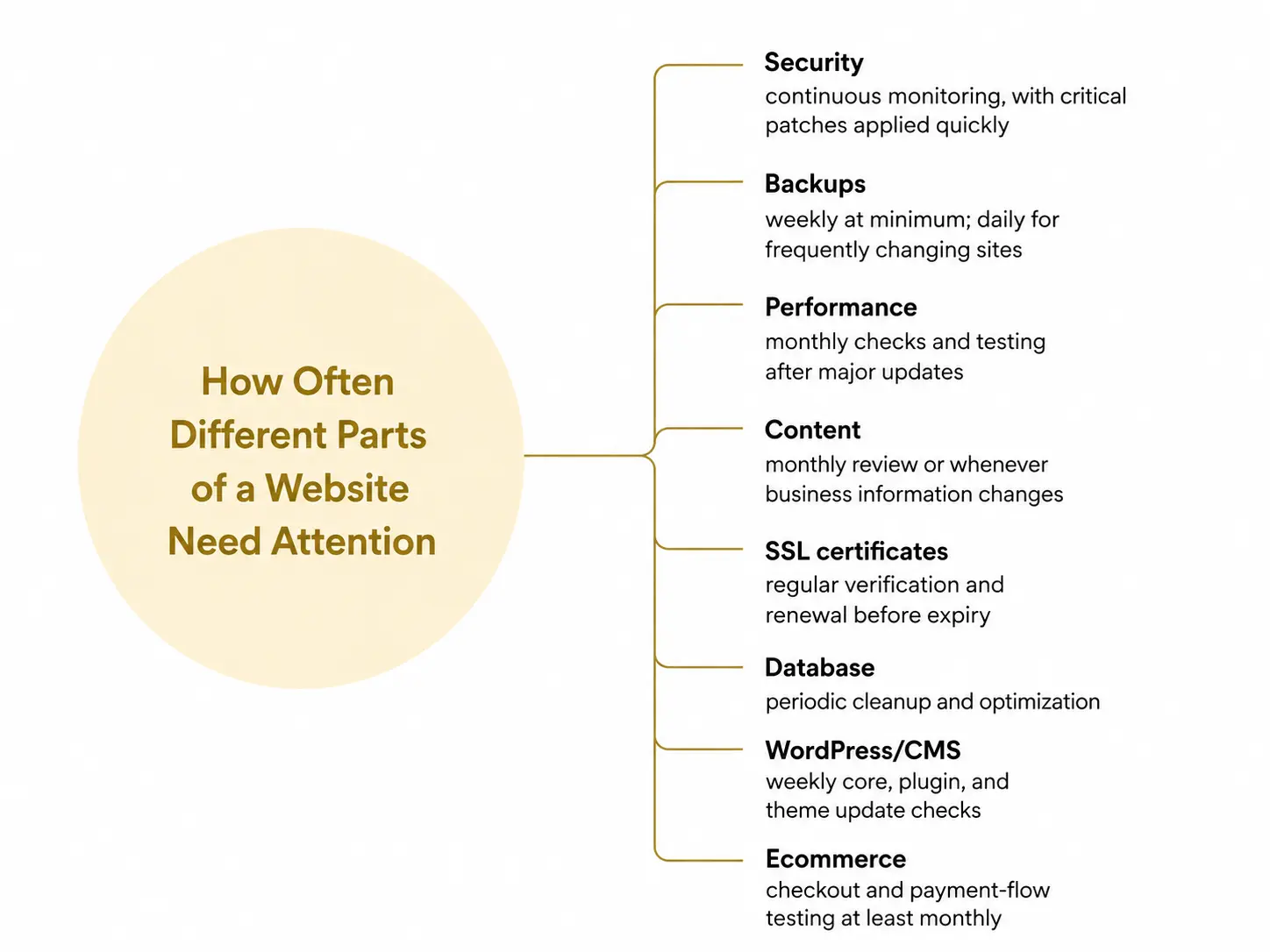
Maintenance is not one task; it is several, and each part of a site has its own natural rhythm. Security-related work moves fastest because threats appear and spread quickly. Content and design move more slowly, since a page that reads well today will often still read well next month.
Security: continuous monitoring, with critical patches applied within hours, not weeks.
Backups: weekly at minimum; daily for sites that change often.
Performance and speed: monthly checks, plus a deeper review after major changes.
Content: monthly review for accuracy; refreshes as products, prices, and information change.
SSL certificates: verified regularly and renewed before expiry.
Database: periodic cleanup and optimization to prevent slowdown.
CMS-based sites (e.g., WordPress): plugin, theme, and core updates checked weekly.
E-commerce sites: checkout and payment flows tested at least monthly, and more during peak seasons.
Core Website Maintenance Tasks Explained
Frequency only matters if you know what actually happens during each check-in. A solid maintenance routine covers both the visible parts of the site and the systems behind them, from load speed and security patches to backups, forms, and infrastructure health.
Check Website Speed and Performance
Speed is tied directly to user experience, rankings, and revenue. Research from Google shows that as page load time rises from one to three seconds, the probability of a bounce increases by 32%, and more than half of mobile visitors leave a site that takes longer than three seconds to load. Monthly benchmarking helps you catch quiet decline caused by oversized images, unused scripts, poor caching, or growing page weight before it starts affecting visitors.
Back Up Your Website
Backups are your safety net against hardware failure, botched updates, malware, and human error. They should run automatically, be stored off-site, and be checked occasionally with a test restore. That last step matters because a backup is only useful if it can actually bring the site back when something goes wrong.
Run Security Updates and Review Site Security
Security is never “done.” Plugins, themes, and core software need prompt updates, but the process should also include malware scans, strong admin-password policies, SSL verification, and removing inactive user accounts. The timing matters more than many site owners realize. Because exploits can begin within about five hours of a vulnerability going public, the gap between “patch available” and “patch applied” is where many compromises happen.
Remove Unused Plugins, Themes, and Extensions
Every installed add-on is a potential entry point, whether it is active or not. Old plugins and themes can create security risk, compatibility issues, and extra maintenance overhead even when they are no longer being used. Delete, rather than just deactivate, anything you no longer need, and avoid abandoned add-ons that no longer receive updates.
Scan for Broken Links and 404 Errors
Broken links frustrate users and confuse search crawlers. They often appear gradually as pages are moved, deleted, or renamed, and they can build up quietly if nobody checks for them. Regular scans help you catch missing pages, fix internal links, replace dead external links, and set up redirects before the damage spreads across the site.
Monitor and Analyze Content Performance
Maintenance is not only about code and security. Analytics show which pages are attracting traffic, converting visitors, and slipping over time. Reviewing those numbers monthly helps you spot weak pages, refresh outdated stats or calls to action, and use high-performing pages as models for underperforming ones.
Test E-commerce Checkout Processes
For online stores, a broken coupon, a failed payment step, or a missing confirmation email can cost real money before anyone notices. That is why checkout should be tested as a full user journey, not as a quick glance at the cart page. Walk through the process on desktop and mobile, apply a code, try each payment method, and confirm the receipt email actually arrives.
Update Content and Key Information
Hours, contact details, pricing, service pages, team information, and legal content all drift out of date over time. These are small details individually, but together they shape whether visitors trust the site. A regular content review keeps important information current and stops outdated details from quietly hurting credibility.
Review Server, Hosting, and Database Health
Behind every stable website is reliable infrastructure. Disk usage, storage limits, server logs, firewall settings, SSL status, and database performance should all be checked regularly. If traffic grows or resource use starts pushing the limits of the hosting plan, that needs attention before it turns into slow performance or downtime.
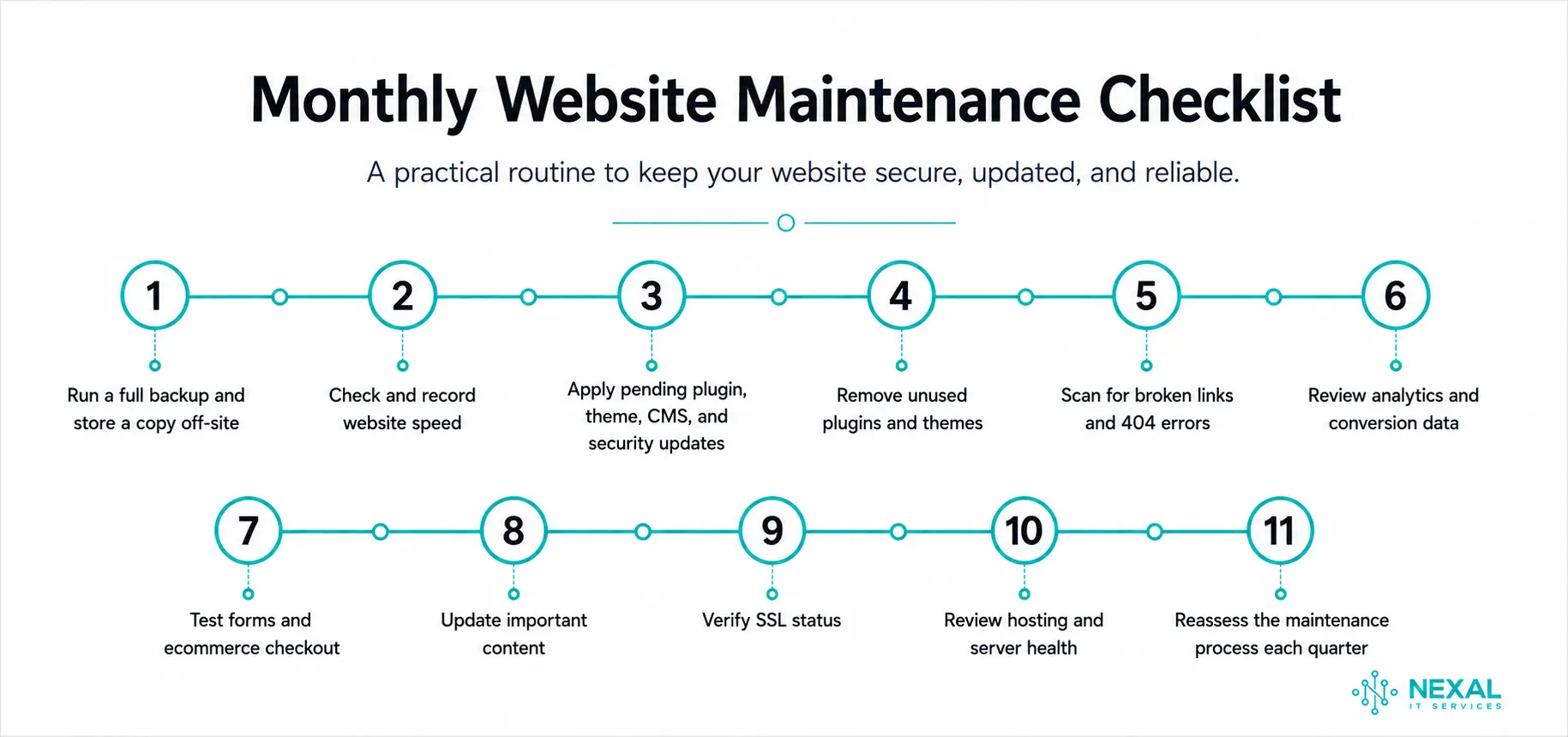
A Simple Monthly Maintenance Checklist
For most business websites, a monthly review should cover the systems most likely to affect security, performance, and user experience.
Run a full backup and store a copy off-site
Check and record website speed
Apply pending plugin, theme, CMS, and security updates
Remove unused plugins and themes
Scan for broken links and 404 errors
Review analytics and conversion data
Test forms and ecommerce checkout
Update important content
Verify SSL status
Review hosting and server health
Reassess the maintenance process each quarter
Signs Your Maintenance Schedule Isn't Frequent Enough
A schedule can look fine on paper and still be too slow in practice. The clearest warning signs usually show up in patterns: recurring issues, growing errors, or customers spotting problems before you do.
The Same Issue Keeps Coming Back
If a broken link, failed form, or small functionality issue reappears weeks after it was fixed, the root cause may never have been addressed. It can also mean the gap between checks is long enough for the same problem to return before anyone notices.
Plugin or Integration Conflicts Happen Often
If updates regularly break something else, your review cycle is probably too slow for the complexity of the site. Plugins, APIs, and third-party services all change on their own schedules, so a weekly check often catches issues earlier than a monthly one.
Crawl Errors Pile Up Between Reviews
A few crawl errors are normal. A growing backlog is different. If indexing issues, redirect problems, or missing-page errors keep stacking up between reviews, your maintenance rhythm is not keeping pace with how the site actually changes.
Visitors Notice Outdated Content Before You Do
If customers are the ones pointing out old prices, expired offers, incorrect hours, or former employee photos, your content review process is lagging behind the business. That is usually a sign the schedule needs tightening.
You Hear About Downtime From Customers
If the first alert about an outage comes from a support ticket instead of your monitoring tools, the problem is not only the downtime itself. It is also that your monitoring setup is not catching incidents early enough.
What Happens If You Neglect Website Maintenance?
A single missed week rarely causes visible damage. The real danger is accumulation. Unpatched software builds up known vulnerabilities, small performance issues pile on, content drifts out of date, and minor feature failures go unnoticed. By the time a visitor can clearly see the problem, it has often been developing for a while.
Skipping maintenance is not a one-time gamble because the web itself keeps moving. Browsers update, devices change, search systems shift, and new vulnerabilities appear constantly. A site that stops keeping up does not stay in place; it gradually falls behind.
DIY vs. Hiring a Professional
A simple, low-traffic site can often stay on schedule with owner-led maintenance, especially when it runs on a CMS built for non-technical editing. The trade-offs are still real: it takes time, security gaps are easy to miss, and recovery becomes much harder if something goes wrong.
For larger sites, or any site handling payments and customer data, professional oversight usually makes more sense because both the technical risk and the cost of a mistake are higher.
For businesses that would rather not manage this in-house, Nexal IT Services' WordPress maintenance services can take over the recurring work and keep the schedule consistent.
What's Included in a Website Maintenance Package
Maintenance packages vary by provider and tier, but a strong plan typically includes the core systems needed to keep a site secure, recoverable, and stable.
24/7 uptime and performance monitoring
Regular plugin, theme, and CMS updates
Daily or weekly backups with restore support
Security patches, malware scanning, and firewall management
Broken-link fixes and routine content or image updates
Compatibility testing across devices and browsers
Analytics and reporting in plain language
The right tier depends on the size of the site and how much of the work you want handled for you. If you are comparing options, our guide on how much website maintenance costs per month breaks down what different plans include and what drives the price.
When to Upgrade Your Maintenance Plan?
A plan that fit your site last year may not fit it now. Growth changes the workload. More traffic, more pages, more features, and more customer activity all create more dependencies that need monitoring.
It is usually time to move up a tier when you see:
A meaningful jump in traffic
New content, features, or sections added regularly
Added e-commerce or payment functionality
Growing lead-generation or customer-account needs
These changes increase complexity, and complexity usually requires more frequent and more thorough maintenance to stay stable.
How Nexal IT Services Keeps Your Website Healthy
Most website problems start small. A skipped update, an untested backup, a plugin conflict, or a form that stops sending emails may sit unnoticed until a customer reaches the affected part of the site.
Nexal IT Services keeps these systems on a regular maintenance schedule so problems can be caught earlier rather than handled after something breaks.
| What We Handle | |
|---|---|
| Uptime and security monitoring | Continuous |
| Backups with restore testing | Daily or weekly |
| Plugin, theme, and core updates | Weekly |
| Speed, content, and analytics review | Monthly |
| Full security and performance audit | Annually |
The schedule can be adjusted around the website because a simple company site does not need the same workload as a WooCommerce store or customer platform.
Stop Maintaining Your Site in Fire-Drill Mode
Put updates, backups, monitoring, and performance checks on a regular schedule so technical problems can be found before customers see them.

Frequently Asked Questions
Most websites should be checked weekly for security and backups and reviewed monthly for software updates, content accuracy, analytics, and speed. A deeper audit covering performance, accessibility, and design can usually be done once a year, although higher-risk sites may need more frequent review.
Final Thoughts
How often a website needs maintenance comes down to one idea: match the schedule to the workload. Weekly security and backups, monthly reviews, and an annual audit give most sites a solid baseline, and from there you can tighten or relax the rhythm based on size, platform, traffic, and risk.
The businesses that avoid nasty surprises are not the ones that never have issues. They are the ones that catch problems early, on a schedule, before a small gap becomes visible failure. Whether you manage the work internally or hand it to a provider, the goal stays the same: a website that remains fast, secure, and current without depending on anyone remembering to check.